
Do you want to buy or sell a vehicle and need more information? You can check the vehicle's license plate through an app! This tool is great for checking if everything is correct with the car you want to buy or sell, ensuring security in the negotiation.
The vehicle license plate checker app allows you to check the status of your vehicle and, if you have questions about fines, IPVA (vehicle tax) and even whether the car has any legal restrictions, checking the license plate gives you all these answers. This way, you avoid headaches when doing business or even just being up to date with everything about your own car.
So, if you are curious to find out how an app can offer you so many details and want to feel more secure about the information about a car or motorcycle, follow along here and we will show you how to do it. Read on to understand how these apps work and how they can make your life easier.

Platform and application options for checking vehicle license plates
DMV Portal
The Detran portal is the official channel of the State Department of Traffic, where you can obtain reliable information about any vehicle. Using this service, you can have access to detailed data, without having to pay anything for it. Here is the step by step:
- Access the DMV website corresponding to the vehicle's registration status.
- Locate the vehicle search option and enter the requested data, such as the license plate and, in some cases, the Renavam.
- View the information detailed information about the vehicle's situation, such as debts, fines, licensing history and various restrictions.
The convenience of searching online makes your day-to-day life much easier, whether you are a buyer, seller or simply someone who wants to check information about a specific vehicle. Remember: the data may be updated frequently, so it is always a good idea to check before carrying out any vehicle transaction.
Gringo App
Looking for a quick way to check a vehicle's license plate? Then check out the Gringo app! It's a fast and reliable option for accessing vehicle data. It will help you check a lot of important information without wasting time..
- First, download Gringo from your phone's app store. Whether on Google Play or the App Store, the app is there, waiting for you.
- After downloading, open the application and register. It's quick: you enter some personal details and create an account.
- Now just enter the license plate of the vehicle you want to check. With just a few taps on the screen, you have access to fines, IPVA and licensing. Simple, right?
Gringo also provides information on other pending issues, such as overdue licensing or any existing debt. And best of all, the app is available for iOS and Android, ready to help you anywhere.
Sinesp Citizen App
Sinesp Cidadão is an official Federal Government application that allows you to check vehicle license plates in a safe and reliable manner. With it, you can find out if there is any theft or robbery associated with the vehicle, as well as other important information.
- First, download Sinesp Cidadão from your cell phone's app store, either on Google Play or the App Store.
- Open the app and click on the 'Vehicles' section.
- Enter the license plate of the vehicle you wish to consult.
- Confirm the data and proceed to the consultation.
- Analyze the information provided, ranging from theft and robbery situations to vehicle data such as make, model and year.
By using Sinesp Cidadão, you have access to an updated database that informs you about the status of any vehicle. The initiative is part of a national effort to keep vehicle information available to the population and contribute to public safety.
Available for both Android and iOS devices, the app can be a great help to you, especially before buying or selling a vehicle. Always check the information about a car or motorcycle before closing a deal. With the Sinesp Cidadão app, this query can be done quickly and conveniently, directly from your cell phone screen.
Now that you know more about this app and how to use it, you can feel more confident when dealing with vehicle issues. How about practicing and checking a license plate right now? This way you can ensure that you are making a good deal or simply staying informed about your vehicle.
Sinesp Citizen app link for Android
Sinesp Citizen app link for iOS
Zul+ App
If you are looking for a simple and complete way to check vehicle data, the Zul+ app is a great choice. It is an easy-to-use app that gives you access to information about fines, IPVA, licensing and other services related to vehicles in several states. What's more, the app offers direct payment options, which can help you resolve outstanding issues quickly. Check out:
- Download Zul+ from your mobile app store: The app is available on both Google Play and the App Store.
- Register in the app: This is done quickly by entering a few personal details.
- Enter the license plate of the vehicle you wish to consult: You will find this option easily on the home screen.
- Choose the type of query you need to make: It could be a fine, IPVA or licensing check, for example.
The information about the consultation and payment options is convenient. Thanks to the updated database, you will be able to see everything you need regarding fines and other issues that may be pending on your car or motorcycle. By doing this, you can rest assured that everything is in order with your vehicle or that you already know what needs to be resolved.
Consultations and payments made easy with Zul+
With Zul+, you can not only find out if your vehicle has any outstanding debts, but also deal with them immediately. If there is a fine or the IPVA is overdue, the app allows you to pay it right away. Keep your vehicle status up to date, avoiding future complications. The app is a practical way to keep everything about vehicles under control, without having to waste time in queues or bureaucracy.
If you have any questions about vehicles, why not try Zul+ right now? See how easy it is to check the license plate and stay up to date with all the information about your car or motorcycle. And if you have any pending issues, you can resolve them using the app itself. Practical, right?
Query by QR code
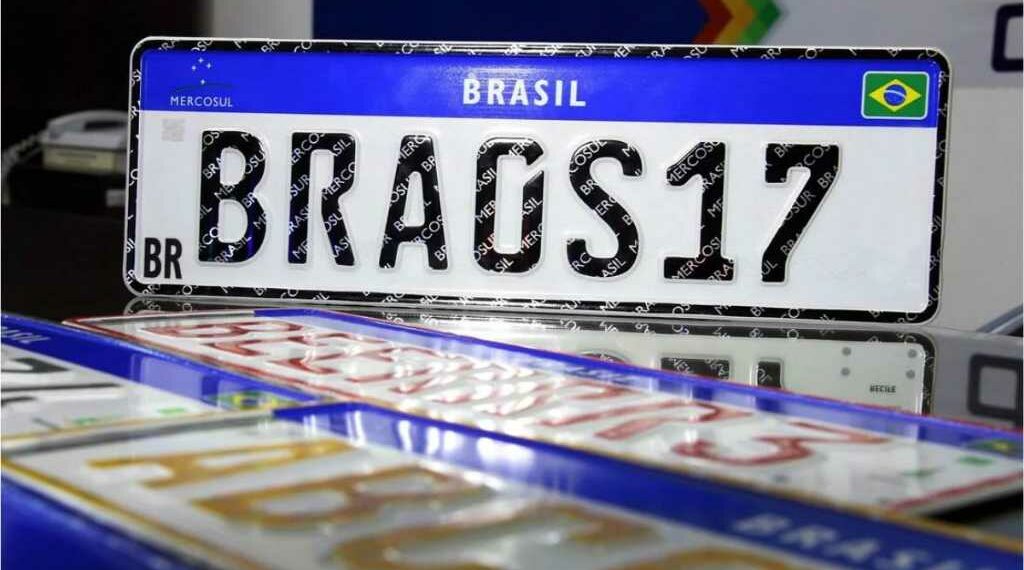
Did you know that you can use the QR code on Mercosur standard license plates to learn more about a vehicle? These plates contain a special QR code that, when scanned, can tell you whether the plate is original and which company manufactured it. This technology represents an advance in security, as it makes fraudulent actions more difficult.
By scanning this code with a specific app, such as the Vio app, you can access information related to the license plate and verify its authenticity. This is an efficient way to combat counterfeiting and ensure that the vehicle does not have any illegal alterations to the plates.
To perform this query, you don't need much. All you need is a smartphone, an app that reads QR codes and that's it:
- Open the app that you will use to read the QR code.
- Point your smartphone camera at the QR code present on the vehicle's license plate.
- Capture the image and that's it: You will have access to the information linked to this plate, such as confirmation that it is a regulated plate and which company is responsible for producing it.
This gives you the option of checking additional details through a simple optical scan. It is a quick and effective way to ensure even greater security when obtaining information about any vehicle.
Conclusion
Now that you know the many ways to check a vehicle's license plate, rest assured that you can access a range of reliable and up-to-date information. Whether through the Gringo app, Detran, Sinesp Cidadão, Zul+ or even using the QR code on Mercosul license plates, each tool offers specific details that help you find out more information about the vehicle.
Using these tools ensures transparency and security in your transactions. Checking a vehicle's license plate opens doors to knowing exactly what you are dealing with, whether for negotiations, checking legality or simply curiosity about the vehicle's condition.
Remember to always check the vehicle's details with these facilities at your fingertips. And, since technology is there to help, take advantage of the opportunity to get information without complications and keep everything under control, avoiding future problems. It is an essential step to making informed and calm decisions.